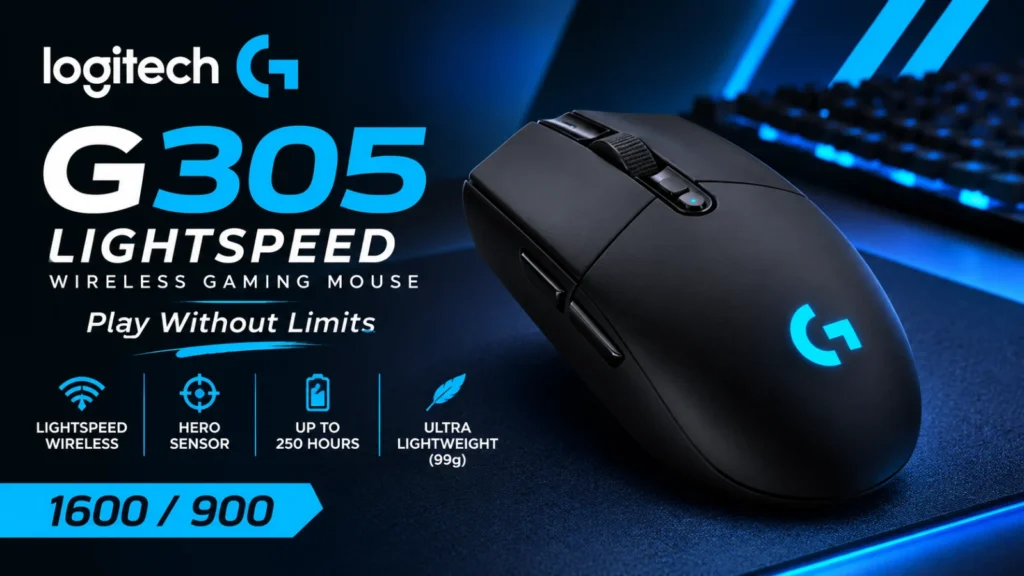

The Logitech G305 Lightspeed wireless gaming mouse is a solid budget pick for most PC players.
It pairs a 12,000 DPI HERO sensor with 1 ms wireless and a single AA battery that Logitech says lasts up to 250 hours.
Published reviewers mostly agree it offers reliable performance at a fair price, with a few clear trade-offs.
Those trade-offs matter. The battery is not rechargeable, there is no Bluetooth, and some reviewers found the mouse small for bigger hands.
Logitech has also released a newer model, the G305 X SUPERLIGHT, which changes several of these points.
In this guide, we explain the specs in plain English, cover battery life, comfort and performance, and say who should buy it and who should skip it.
We haven’t tested the mouse hands-on: this review is based on Logitech’s specs and published expert tests. This is an information blog, so we don’t sell mice or offer downloads. Check Logitech’s official site for current details and prices.
Quick Facts
- Type: wireless gaming mouse using a 2.4 GHz LIGHTSPEED USB receiver (no Bluetooth)
- Sensor: HERO, 200 to 12,000 DPI
- Weight: 99 g, per Logitech
- Battery: 1 x AA, up to 250 hours, per Logitech
- Buttons: 6 programmable
- Works with: Windows 7 or later, macOS 10.13 or later, ChromeOS, per Logitech’s listing
- Warranty: 2-year limited hardware warranty, per a Logitech regional page
- Price: varies by store and region. Check the current price before buying.
- Note: Specs are as of November 2026, and some regional Logitech pages differ slightly. This is an information blog. We don’t sell mice or offer downloads.
What Is the Logitech G305 Lightspeed?
The G305 is a budget-friendly wireless gaming mouse from Logitech G. It connects through a small USB receiver using LIGHTSPEED, Logitech’s 2.4 GHz wireless system designed to feel as fast as a cable. Logitech pitches it as serious performance at an affordable price. Tom’s Guide lists five colours: lilac, blue, mint, black and white. Colour availability varies by region.
G305 vs G304: Same Mouse?
You may see both names. ProSettings notes that the G305 is called the G304 in some parts of the world, with the exact same specs. Some of Logitech’s own regional pages even mix the two names. If you spot a G304 listing, check the product photo and the part number before assuming it is a different mouse.
Where Does the G305 X SUPERLIGHT Fit?
RTINGS describes the G305 X SUPERLIGHT as a newer version of the original G305 LIGHTSPEED. This guide covers the original. We compare the two in a separate section below.
Logitech G305 Specs Explained
Here are the key Logitech G305 specs, with a plain-English note on what each one means.
| Spec | Value | What it means |
| Sensor | HERO optical | The part that tracks your hand movement. Logitech says it uses zero smoothing, filtering or acceleration. |
| DPI range | 200 to 12,000 | DPI (dots per inch) sets how far the cursor moves per inch of hand movement. Higher is faster. |
| Max speed | 400 IPS | Inches per second the sensor can track before it loses accuracy. Tested by Logitech on its G240 pad. |
| Max acceleration | 40 G | How quickly you can flick the mouse before tracking breaks. Also tested on the G240. |
| Wireless report rate | 1000 Hz (1 ms) | How often the mouse reports its position to the PC. Faster means less delay. |
| Processor | 32-bit ARM | The chip inside the mouse that handles the sensor and wireless signal. |
| Battery | 1 x AA, 250 hours | Logitech’s stated life in normal performance mode. |
| Buttons | 6 programmable | Left, right, middle, a DPI button and two side buttons. The main switches are rated for 10 million clicks. |
| Weight | 99 g | Logitech calls this lightweight for a wireless mouse. |
| Size | 116.6 x 62.15 x 38.2 mm | Length, width and depth, as listed by Logitech. One page shows the width as 62.1 mm. |
| Warranty | 2-year limited hardware | As listed on a Logitech regional page. |
The catch is that these are manufacturer numbers. Real-world battery life, for example, depends on how you use the mouse. We cover that below.
Design and Comfort
The G305 is a small, slim mouse with a simple shape. Tom’s Hardware notes that it feels noticeably light for a wireless mouse. SlashGear reached a similar view but found it a little small and lightweight in the hand. There is no RGB lighting, so anyone who wants glowing effects should look elsewhere.
Hand size is the biggest comfort question. TechRadar warned that the mouse may be too slim for bigger hands, and a shopping-site summary of user feedback says some owners find it a little small. Players with large hands, or those who like a palm grip (resting your whole palm on the mouse), should think twice.
The shape is symmetrical, but B&H lists the G305 as a right-handed mouse. Left-handed players should check the button layout before buying. One handy touch: the USB receiver can be stored inside the mouse, which makes it easy to travel with.
Logitech G305 Battery Life
The G305 runs on a single AA battery, and Logitech lists up to 250 hours of use. Logitech product text on a retailer page also describes an Endurance mode, selected through Logitech G HUB software, that can stretch a battery to up to 9 months of typical use. In that mode, the mouse reports its position every 8 ms instead of every 1 ms, so it gives up some responsiveness to save power.
That page also says the mouse and G HUB warn you when about 15% of the battery remains. Treat all of these as best-case figures, not guarantees.
The main drawback is that the battery is not rechargeable. Tom’s Hardware points out that similarly priced rivals can be recharged, and Tom’s Guide made the same criticism. In practice, that means keeping a spare AA at hand. If you want a built-in rechargeable battery, look at other mice or the newer G305 X SUPERLIGHT.
Gaming Performance: Is the G305 Good for FPS?
For most players, yes. The HERO sensor is the main reason. PCWorld found that it performed as well as the well-regarded PWM3366 sensor. Tom’s Hardware found it responsive on a gaming mouse pad and with no pad at all, and ProSettings described the wireless performance as flawless for the price.
There are limits, though. TechRadar noted there is no dedicated sniper button, which is a button that temporarily lowers your DPI for precise aim. The default 1000 Hz report rate is also lower than some newer mice offer. Opinions on weight differ too. Logitech calls 99 g ultra-lightweight, but ProSettings and a Tech4Gamers review both found it a bit heavy, compared with the lightest mice made for esports.
The takeaway is that the G305 suits casual and mid-level players well, but it is not the lightest or most advanced option for competitive esports.
Software and Customization
You can use the mouse straight out of the box. Logitech G HUB, Logitech’s optional software, lets you remap the six programmable buttons, change DPI levels and switch to Endurance mode. Only download G HUB from Logitech’s official site.
Onboard memory, which saves your settings inside the mouse, is a point where sources disagree. One retailer page based on Logitech text lists up to 5 profiles with 5 DPI levels each, while another listing shows 1 profile. Check Logitech’s official specs page before you rely on this feature.
On compatibility, Logitech’s listing says Windows 7 or later, macOS 10.13 or later and ChromeOS, plus a free USB port.
Logitech G305 Pros and Cons
Pros
- Reliable wireless connection that reviewers consistently praise
- HERO sensor with a 12,000 DPI range
- Long battery life from a single AA
- Lightweight and easy to carry, with receiver storage built in
- Comes in several colours at an affordable price
Cons
- Battery is not rechargeable
- No Bluetooth, so it works only with the USB receiver
- May feel small or too slim for larger hands
- No dedicated sniper button and no RGB lighting
- Heavier than many esports-focused mice
- Some reviewers feel it lacks features compared with similarly priced rivals
Logitech G305 vs G305 X SUPERLIGHT
Should you buy the original or the newer model? Here is what published sources say about the differences. Check Logitech’s site for the full, current specs of both.
- Weight: a news report puts the G305 X SUPERLIGHT at about 59 g, well below the original’s 99 g. RTINGS agrees it is much lighter than its predecessor, though still heavier than many competing lightweight FPS mice.
- Sensor: the same report lists a 44K DPI sensor, far above the original’s 12,000.
- Connectivity: the X SUPERLIGHT works over a 2.4 GHz receiver or Bluetooth, and can also be used wired through USB-C, according to reviewers.
- Battery: it charges over USB-C. Root Nation says the battery can still be replaced.
- Extras: Root Nation reports RGB lighting and a different feet design. PCGamesN notes the upgrades raised the price, and that 8 kHz mode drains the battery fast.
- Shape: the classic small, symmetrical shape is kept. TechRadar says the low profile is not for everyone.
The trade-off is price. The original G305 costs less, while the X SUPERLIGHT costs more but fixes the AA battery, Bluetooth and weight complaints.
Who Should Buy the G305 (and Who Should Skip It)
Buy it if you want an affordable wireless mouse for gaming and everyday work, you like small mice, or you travel and want something light with built-in receiver storage.
Skip it if you need a rechargeable battery or Bluetooth, you have large hands or a palm grip, you are left-handed, or you want the lightest mouse for competitive esports.
How to Set Up the G305
Setup is simple. Insert an AA battery and plug the USB receiver into your computer, using the one stored inside the mouse. Turn the mouse on, and it should connect automatically. G HUB is optional and only needed for remapping buttons or changing settings. For exact steps, see Logitech’s official setup guide.
Logitech G305 FAQ
1. Is the Logitech G305 good for FPS games?
For most players, yes. Its HERO sensor, fast wireless connection and low weight suit shooters well. Competitive players may prefer lighter mice or higher report rates.
2. How long does the G305 battery last?
Logitech lists up to 250 hours on one AA battery in normal mode, and up to 9 months of typical use in Endurance mode. Real life will vary with how much you play.
3. Does the G305 have Bluetooth or a rechargeable battery?
No to both. It connects only through the USB receiver, and it uses a replaceable AA battery. The newer G305 X SUPERLIGHT adds Bluetooth and USB-C charging.
4. Is the Logitech G305 the same as the G304?
ProSettings says they are the same mouse with the same specs, sold under different names in different regions. Check your local listing to confirm.
5. Does the G305 work on Mac and Chromebook?
Logitech’s listing says it works with macOS 10.13 or later and ChromeOS, as well as Windows 7 or later. It needs a free USB port for the receiver.
Final Verdict on the Logitech G305 Lightspeed
The Logitech G305 Lightspeed wireless gaming mouse is a dependable, affordable choice for casual and mid-level players. Reviewers praise its sensor and wireless reliability, and its long battery life makes it easy to live with.
The drawbacks are real, though. The non-rechargeable AA battery, missing Bluetooth and small size rule it out for some people. If those matter to you, consider the newer G305 X SUPERLIGHT or another mouse. Prices and models change often, so check the official product page before you buy. This is an information blog: we don’t sell mice or offer downloads.
Sources
- Logitech G, G305 product page (regional): https://www.logitechg.com/en-ph/products/gaming-mice/g305-lightspeed-wireless-gaming-mouse.html
- Logitech, G305 shop page (regional): https://www.logitech.com/en-ph/shop/p/g305-lightspeed-wireless-gaming-mouse
- Tom’s Hardware, Logitech G305 Lightspeed review: https://www.tomshardware.com/uk/reviews/logitech-g305-lightspeed