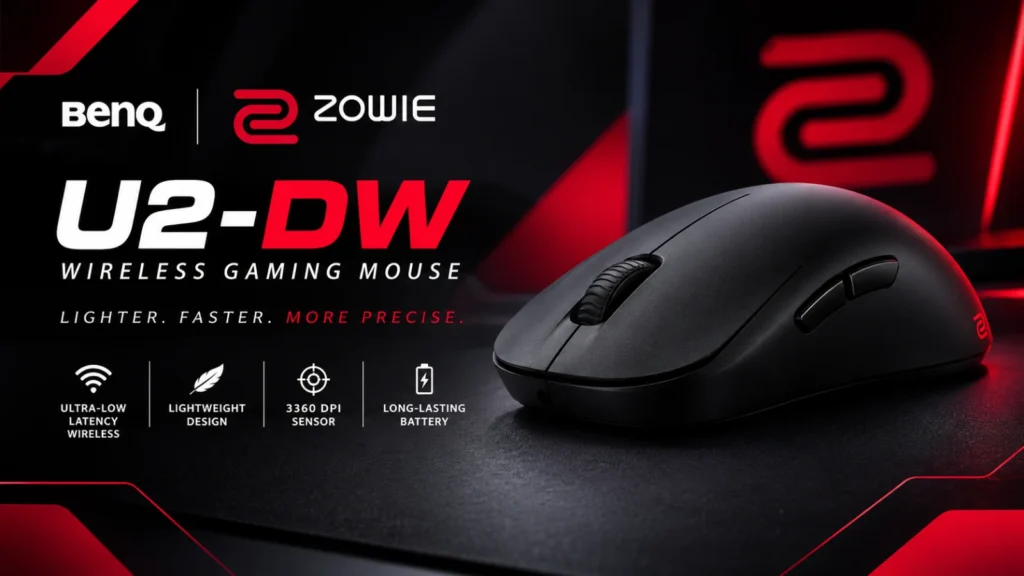

The BenQ Zowie U2-DW wireless gaming mouse is a 60 g, medium-size esports mouse built for claw-grip players, with 4,000 Hz wireless polling, a charging dock and a plug-and-play design that needs no software.
ProSettings gave it 5 out of 5 and called it a sleeper hit, mostly because of its unusual shape, tank-like build and generous box contents.
It isn’t for everyone. The U2-DW has no RGB, no software and no optical switches, its battery life at 4,000 Hz is short without the dock, and Zowie mice sit at the top end of the price range. In this guide, we explain the specs in plain English, cover shape, clicks, battery life and price, and say who should buy it and who should skip it.
We haven’t tested the mouse ourselves. This review is based on BenQ’s official specs and ProSettings’ hands-on review. This is an information blog, so we don’t sell mice or offer downloads. Check BenQ’s official site for current prices and availability.
Quick Facts
- Model: BenQ Zowie U2-DW 4K Wireless Mouse for Esports
- Size and shape: medium, symmetrical shape, listed by BenQ as a right-handed design
- Weight: 60 g
- Buttons: 7
- Connection: 2.4 GHz wireless (a 4K enhanced receiver that doubles as a charging dock, plus a 1,000 Hz USB receiver)
- Polling rate: 125, 500, 1,000, 2,000 or 4,000 Hz
- DPI settings: 400, 800, 1,000, 1,200, 1,600 or 3,200
- Battery: 80 hours at 1,000 Hz, 30 hours at 2,000 Hz, 24 hours at 4,000 Hz
- Price: varies by store and region. Check before buying.
- Last checked: [add date before publishing]
- Note: This is an information blog. We don’t sell mice or offer downloads.
Which Zowie Mouse Is the U2-DW?
Zowie sells its mice in several families. The official site lists the EC series, the FK series, the ZA series, the S series and the U series, and the U2-DW is the only mouse in the U series. The DW at the end of the name means the wireless version. ProSettings compares the shapes this way:
- U2-DW: a high hump with a thin grip section, medium size.
- S2-DW: a similar feel without the thin grip, and a smaller mouse.
- ZA13-DW: a high hump focused toward the back.
- FK2-DW: a flat, low ambidextrous mouse.
- EC series: ergonomic shapes for right-handers.
The U2-DW is the wireless successor to the U2, which ProSettings says shared the same shape but topped out at 1,000 Hz.
BenQ Zowie U2-DW Specs Explained
| Spec | Value | What it means |
| Size | Medium | ProSettings lists 12.3 cm long, 5.8 cm wide and 3.8 cm high. |
| Weight | 60 g | Light enough for fast flicks. |
| Sensor | Not named by BenQ | ProSettings and a retailer list a 3950 sensor, the PAW3950 chip. |
| DPI | 400 to 3,200 | DPI (dots per inch) sets how far the cursor moves per inch of hand movement. |
| Polling rate | Up to 4,000 Hz | How often the mouse reports to the PC. Higher means less delay, though ProSettings says the real-world differences are small. |
| Buttons | 7 | Left, right, scroll click, two side buttons and a DPI button. |
| Switches | Huano mechanical | Traditional switches, not optical, per ProSettings. |
| Click response time | Fast or Normal | An adjustable setting on the mouse. |
| Motion sync | On or off | A setting that aligns sensor data with USB polling. |
| Scroll wheel | 24-step optical | Notched steps you can feel. |
| In the box | Enhanced receiver, USB receiver, USB-C adapter, 2 m cable, skates | Skates are the feet under the mouse. |
The catch is that retailer pages and BenQ’s page don’t agree on every detail, such as the sensor name. Check BenQ’s official page for the exact spec sheet.
Shape and Comfort
The shape is the headline feature. ProSettings describes a hybrid between a small, nimble ambidextrous mouse and a larger, more filling one. The middle of the shell gets very thin, so your thumb and ring finger sit close together for a pen-like feel, while a wider back section fills the base of your hand. The hump is steep, which gives room to shift the mouse in your hand for small corrections.
BenQ says the left side curves inward to reduce the thumb angle and the right side makes room for the ring finger, which it claims gives more balanced force across the hand. These are the maker’s claims, not independent findings.
It isn’t a mouse for every grip. ProSettings says it seems designed for claw grip (fingers arched, palm touching the back). It can work with fingertip or palm grips, depending on hand size, but better shapes exist for those. The reviewer also says it can feel like a jack of all trades, master of none: stable, but not as stable as a big palm mouse, and nimble, but not as nimble as a mini mouse.
On comfort, the coating is reliable and not goopy, though it shows fingerprints easily and some players may want more texture. There are no holes and no RGB, so it’s easy to use at work too.
Clicks, Scroll Wheel and Side Buttons
Zowie still uses Huano mechanical switches instead of the optical switches many rivals use. ProSettings likes the implementation: the main clicks are crisp and robust, with acceptable travel and no side play. It recommends setting the click response time to Fast, since the switches can feel delayed in other modes. If you like very light, spam-friendly clicks, the reviewer suggests staying away.
The scroll wheel has rigid steps and is on the louder side. ProSettings says that’s great for switching weapons or bunny-hopping, but annoying if you scroll through spreadsheets all day. The side buttons are slightly thinner than the original U2 with a bigger gap between them, so they are easier to tell apart by touch.
Performance and Settings
The U2-DW offers 4,000 Hz polling thanks to a newer sensor. ProSettings saw no sensor issues in testing and found the mouse accurate and consistent. It adds that the benefit of 4,000 Hz depends on your setup and how sensitive you are, and that the differences can be small.
There is no software. Every adjustment is made with physical buttons on the underside of the mouse, according to B&H and ProSettings: DPI, report rate, lift-off distance (how high you can lift before tracking stops), click response time and motion sync. ProSettings likes the simplicity and the plug-and-play convenience. The downside is that you can’t remap buttons, create macros or choose uncommon DPI values.
The DPI range tops out at 3,200. That is fine for most players. PC Gamer says most people use well under 2,000 DPI.
Battery Life and the Charging Dock
On paper, battery life isn’t great. BenQ lists 80 hours at 1,000 Hz, falling to 30 hours at 2,000 Hz and 24 hours at 4,000 Hz. But ProSettings points out that the enhanced receiver doubles as a charging dock, so you can set the mouse on it between sessions. After months of testing, the reviewer never got close to an empty battery.
BenQ also says the receiver is designed to reduce interference. It faces toward the mouse and has a smaller reception range at the back, which should cut signals from behind. That is a manufacturer claim. ProSettings reports no wireless problems.
What’s in the Box
The box is generous. ProSettings lists the mouse, the 4K enhanced receiver and dock, a second skate set, a 1,000 Hz dongle with an extender, a USB-C to USB-A cable and documentation. It notes one set of skates is tuned for speed and one for control, and that the difference between them isn’t huge.
Price and Value
Prices vary widely, so check carefully:
- Adorama listed the mouse at $149.99, reduced from $159.99, on a page last seen in spring 2026.
- A Canadian retailer listed an MSRP of $187.95 with a $170.95 price.
- A European price-comparison page showed about €130 at Amazon in August 2026.
ProSettings says Zowie mice are priced at the top end of the market, but it feels the extras in the box give good value. Stock and pricing change often, so check BenQ’s Where to Buy page before you buy.
BenQ Zowie U2-DW Pros and Cons
Pros
- Distinctive shape that blends stability and agility
- Very solid build quality
- Charging dock and a second receiver in the box
- 4,000 Hz polling and a modern sensor
- Plug-and-play with no software to manage
- Light at 60 g, with no RGB and a clean look
Cons
- Short battery life at 4,000 Hz without the dock
- No optical switches, which some players may dislike
- No software, so no remapping or macros
- Best for claw grip and right-handed use
- Loud scroll wheel
- DPI tops out at 3,200
- Priced at the high end
U2-DW vs U2: Is the Upgrade Worth It?
ProSettings says the shape of the U2-DW is the same as the U2, with one change: the back slope now rounds off where it meets the base, because Zowie says the old design could dig into the pad or palm on downward movements. The U2-DW also adds 4,000 Hz polling. If you don’t need that, ProSettings says the original U2 performs the same as its successor, though it is a different (wired, 1,000 Hz) product.
Who Should Buy It (and Who Should Skip It)
Buy it if you use a claw grip, want a light plug-and-play mouse without software, like the idea of a charging dock, and are happy with mechanical switches.
Skip it if you use a palm grip or are left-handed, want RGB or optical switches, need button remapping or macros, or want the lowest price. The side buttons are on one side, and BenQ calls the design right-handed.
What Other Experts Say
ProSettings gave the U2-DW 5 out of 5 and a Staff’s Choice award, and its page said 11 players used it as of November 2026. We read that review in full. We did not find other independent reviews of this model in our research, so treat it as one expert opinion.
BenQ Zowie U2-DW FAQ
1. Is the Zowie U2-DW good for FPS games?
Yes. It is a light, esports-focused mouse, and ProSettings found it accurate with a good claw-grip shape. Players who prefer other grips may like a different shape.
2. How long does the Zowie U2-DW battery last?
BenQ lists 80 hours at 1,000 Hz and 24 hours at 4,000 Hz. The charging dock makes this much less of an issue in daily use.
3. Does the Zowie U2-DW have software?
No. It is plug-and-play. You change DPI, report rate and other settings with buttons under the mouse.
4. Is the Zowie U2-DW left-handed friendly?
It has a symmetrical shape, but BenQ lists it as a right-handed design, and the side buttons are on one side. Left-handed players should check before buying.
5. What is the difference between the U2-DW and the U2?
The U2-DW is the wireless version with 4,000 Hz polling and a slightly rounded rear slope. The shape is otherwise the same.
Final Verdict on the BenQ Zowie U2-DW
The BenQ Zowie U2-DW wireless gaming mouse is a distinctive, well-built esports mouse that rewards claw-grip players. As of late 2026, ProSettings’ top score and the useful extras in the box make it easy to recommend to anyone who likes the shape.
The drawbacks are real. It has no software, no optical switches and a premium price, and battery life at 4,000 Hz is short without the dock. Check BenQ’s official site for current prices and availability. This is an information blog: we don’t sell mice or offer downloads.
Sources
- BenQ Zowie, U2-DW product page: https://zowie.benq.com/en-sg/mouse/u2-dw.html
- ProSettings, ZOWIE U2-DW review: https://prosettings.net/reviews/zowie-u2-dw
- B&H, BenQ Zowie U2-DW listing: https://www.bhphotovideo.com/c/product/1872690-REG/benq_u2_dw_wireless_gaming_mouse.html
- Adorama, BenQ Zowie U2-DW listing: https://www.adorama.com/bqu2dw.html
- Best Buy, refurbished Zowie U2-DW listing: https://www.bestbuy.com/product/benq-zowie-u2-dw-4k-wireless-gaming-mouse-3950-sensor-4k-polling-rate-7-button-symmetrical-design-wireless-black/JXR7WY96J7/sku/12297097
- Compra Smartphone, Zowie U2-DW price comparison: https://comprasmartphone.com/ratones/benq-zowie-u2-dw-4k-wireless-mouse
- PC Gamer, best gaming mouse: https://www.pcgamer.com/the-best-gaming-mouse/